In the spirit of Network to Code’s continuing development in the ChatOps space, we are releasing a new Nautobot app. It is an application to interact with Arista CloudVision using the existing Nautobot ChatOps framework. This ChatOps integration comes pre-packaged with commands to gather various data about CloudVision (CV). You can now get key information from CV directly from chat!
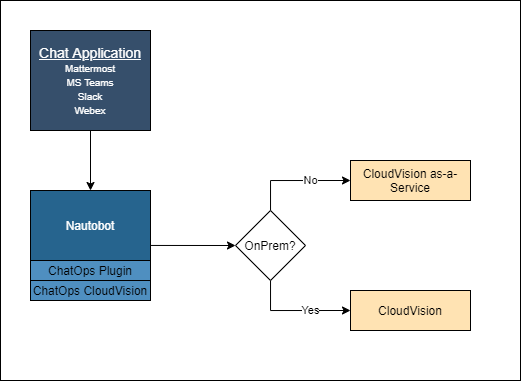
This app can work with either an on-prem instance of CloudVision or CloudVision as-a-Service. For installation steps, refer to the app’s README. To install the underlying Nautobot ChatOps framework, refer to the documentation found here.
Looking at the image below gives a visual representation of how this app works with the core ChatOps app & plugin.
The Nautobot ChatOps CloudVision plugin extends the capabilities of the Nautobot ChatOps framework addding a new chat command. The new CloudVision plugin introduces the following commands:
get-devices-in-container
get-configlet
get-device-configuration
get-task-logs
get-applied-configlets
get-active-events
get-tags
get-device-cve
Get Devices in Container
The get-devices-in-container sub-command will prompt the user to choose a container from the existing containers in CloudVision. It will then give you a list of all devices in the chosen container.
Get Configlet
The get-configlet sub-command will query CloudVision for the currently defined configlets, ask you to choose one, and give you the contents of the chosen configlet.
Get Device Configuration
The get-device-configuration sub-command queries CloudVision for all of its devices, prompts you to choose one, and retrieves the specified device configuration.
Get Task Logs
The get-task-logs sub-command allows you to choose a task by Task ID. It will then give you the logs of that task.
Get Applied Configlets
The get-applied-configlets sub-command allows you to get a list of configlets applied to either a container or a device.
Get Active Events
The get-active-events sub-command allows you to get active events filtered by device, type, or severity within a given time frame. When the sub-command is executed, a prompt will ask you for the filter you wish to apply. From there it will ask you for a start time. We configured it so that you may specify a start time relative to the current time by using an h for hours, d for days, and w for weeks. For example, when prompted for a start time, you’d enter the value -2w if you wanted to go back 2 weeks from the current time. For 2 days, you’d type -2d. The last prompt asks you for an end time. You can again use the same syntax mentioned before but you may also type the word now to use the current time.
Get Tags
The get-tags sub-command will present a list of all the tags assigned to a specific device.
Get Device CVE
The get-device-cve sub-command gets a list of all CVE’s discovered by CloudVision for a specific device.
Conclusion
These commands only handle a subset of the information that can be gathered by a CloudVision chatbot. You can contribute more commands with minimal Python code! Because the Nautobot ChatOps plugin lowers the barrier of entry by already handling the interaction between Nautobot and chat applications like Mattermost, Microsoft Teams, Slack, and Webex, creating new commands is extremely easy. We encourage you to create your own commands by building on top of existing commands and plugins we at NTC have created, or to create your own command to interact with something you use on a daily basis. We’re going to continue creating new plugins for ChatOps, so keep an eye out for additional announcements here!
Does this all sound amazing? Want to know more about how Network to Code can help you do this, reach out to our sales team. If you want to help make this a reality for our clients, check out our careers page.