Exploring Jinja2 Variable Syntax in Ansible

breadscrumb-bg why-bg

When working with Ansible playbooks and jinja2, you might notice different jinja2 syntax to access data. Some use square brackets (backup_commands['ios']) while others use dot notation (backup_commands.ios) when accessing data.

Both ways are valid and work fairly well, but some would say it’s safer to use [] bracket rather than . dot notation to access data in a production environment. For demo purposes, I tend to use the. notation just to type quicker but that won’t always work if accessing data from a variable.

Note: Other reasons to use square brackets:

  • When a variable name includes a hyphen (-)
  • When dynamically generating a dictionary key

Let’s look at a few examples and see why it’s not always possible to access data using the dot(.) notation and it’s always possible to access data using the square brackets([]).

Using Ansible to Access Dictionary Values

First let’s test this playbook called brackets_vs_dot.yml and run it.

A variable has been created under vars called backup_commands and nested, there are a few { "key": "value" } pairs with different vendors as keys and commands as values to access.

backup_commands:
  ios:  "show run"
  nxos:  "show run"
  junos:  "show configuration"

Four debug tasks have also been added that will print out each key in a nested dict of dicts. Two of the tasks will use bracket [] notation and the other two will use dot . notation.

---

    - name: Accessing values through dict keys
      hosts: localhost
      connection: local
      gather_facts: no

      vars:
        backup_commands:
          ios:  "show run"
          nxos:  "show run"
          junos:  "show configuration"

      tasks:

        - debug:
            var: backup_commands['ios']
        
        - debug:
            var: backup_commands['nxos']
        
        - debug:
            var: backup_commands.ios
        
        - debug:
            var: backup_commands.nxos

After running the playbook, you should see the following output with the values being accessed using the debug module.

ntc@jump-host:ansible$ brackets_vs_dot.yml
PLAY [Accessing values through dict keys] **********************************************************************************************************************************************************************************

TASK [debug] ***************************************************************************************************************************************************************************************************************
ok: [localhost] => {
    "backup_commands['ios']": "show run"
}

TASK [debug] ***************************************************************************************************************************************************************************************************************
ok: [localhost] => {
    "backup_commands['nxos']": "show run"
}

TASK [debug] ***************************************************************************************************************************************************************************************************************
ok: [localhost] => {
    "backup_commands.ios": "show run"
}

TASK [debug] ***************************************************************************************************************************************************************************************************************
ok: [localhost] => {
    "backup_commands.nxos": "show run"
}

PLAY RECAP *****************************************************************************************************************************************************************************************************************
localhost                  : ok=4    changed=0    unreachable=0    failed=0    skipped=0    rescued=0    ignored=0

Based on the output you can see that both bracket [] and . dot notation worked just fine with the same output results.

However, let’s say this time we want to access that same data, but through a variable. The results on this test will be a little different and will show why the . notation doesn’t always work.

This time vars_prompt has been added in a second play with a variable vendor_os to allow the user to pick an os and access the data through the debug tasks.

vars_prompt:
  - name: vendor_os
    prompt: "Enter Vendor OS"
    private: no

In this second play two tasks have been added using [] brackets and . dot notation to access the data based on the variable value entered through the prompt.

    - name: Accessing values through variables
      hosts: localhost
      connection: local
      gather_facts: no
      
      vars_prompt:
        - name: vendor_os
          prompt: "Enter Vendor OS"
          private: no
      
      vars:
        backup_commands:
          ios:  "show run"
          nxos:  "show run"
          junos:  "show configuration"

      tasks:

        - debug:
            var: backup_commands[vendor_os]
        
        - debug:
            var: backup_commands.vendor_os 

Accessing values through variables

Pay close attention to the second debug tasks with the results of "VARIABLE IS NOT DEFINED!".

Enter Vendor OS: junos

After entering junos in the prompt the following output show be displayed:

PLAY [Accessing values through variables] **********************************************************************************************************************************************************************************

TASK [debug] ***************************************************************************************************************************************************************************************************************
ok: [localhost] => {
    "backup_commands[vendor_os]": "show configuration"
}

TASK [debug] ***************************************************************************************************************************************************************************************************************
ok: [localhost] => {
    "backup_commands.vendor_os": "VARIABLE IS NOT DEFINED!"
}

PLAY RECAP *****************************************************************************************************************************************************************************************************************
localhost                  : ok=6    changed=0    unreachable=0    failed=0    skipped=0    rescued=0    ignored=0

If you’re still not convinced why we should stick to using [] bracket notation vs . dot notation then let’s try this out with jinja2.

Comparing Dot Notation vs Square Brackets using Jinja2

For this test the main tool being used is Template Designer for Automation, feel free to use this data and template to test it out yourself:

DATA

Using the same data structure from the previous Ansible test.

backup_commands:
  ios:  "show run"
  nxos:  "show run"
  junos:  "show configuration"

JINJA2 TEMPLATE – Accessing values through dict keys

A similar test to the first play of Ansible will be ran. This time instead of debug tasks, build a jinja2 template and add it in the TEMPLATE column of td4a.

In this example, each key will be accessed with square([]) bracket and dot (.) notation.

Accessing Keys

Bracket Notation:
  ios: {{ backup_commands['ios'] }}
  nxos: {{ backup_commands['nxos'] }}
  junos: {{ backup_commands['junos'] }}

Dot Notation:
  ios:  {{ backup_commands.ios }}
  nxos: {{ backup_commands.nxos }}
  junos: {{ backup_commands.junos }}

After adding the following jinja2 data into the TEMPLATE column, press the RENDER button on the top right of the middle column to view the results.

RESULT

You should see the following results, as expected from the jinja2 template showing that it has successfully accessed each value using both [] brackets and . notation.

Accessing Keys

Bracket Notation:
  ios: show run
  nxos: show run
  junos: show configuration

Dot Notation:
  ios:  show run
  nxos: show run
  junos: show configuration

JINJA2 TEMPLATE – Accessing values through variables

This time run a test with jinja2 for loops, the first one accessing the values through [] brackets and the second one commented out with . notation for now so it doesn’t dispaly an error.

Accessing Variables

Bracket Notation:
{% for vendor_os in backup_commands.keys() %}
  {{ vendor_os }}: {{ backup_commands[vendor_os]  }}
{% endfor %}

Dot Notation:
{% for vendor_os in backup_commands.keys() %}
  {#{{ vendor_os }}: {{ backup_commands.vendor_os }}#}
{% endfor %}

After pressing on the RENDER button again –>  the following output should show up:

RESULT

The first two tests don’t change, the second two show the output as expected using the [] bracket and the . notation doesn’t show anything since it’s commented out.

Accessing Keys

Bracket Notation:
  ios: show run
  nxos: show run
  junos: show configuration

Dot Notation:
  ios:  show run
  nxos: show run
  junos: show configuration

Accessing Variables

Bracket Notation:
  ios: show run
  nxos: show run
  junos: show configuration

Dot Notation:

Finally it’s time to test the dot notation so remove the {##} comments from the jinja2 template to view the results using the . notation.

Dot Notation:
{% for vendor_os in backup_commands.keys() %}
  {{ vendor_os }}: {{ backup_commands.vendor_os }}
{% endfor %}

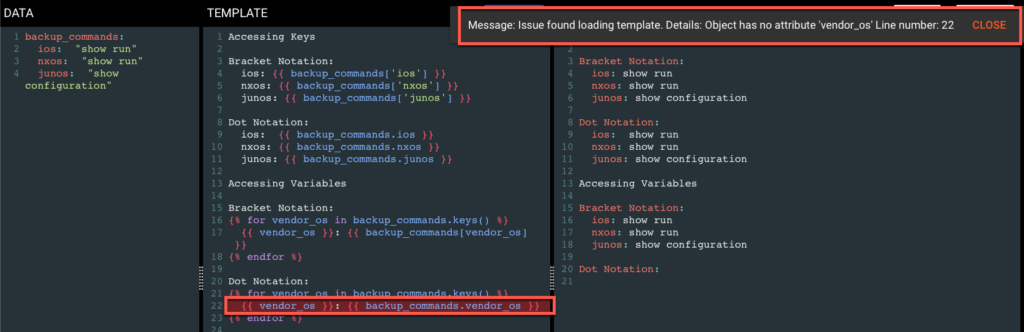
After pressing on the RENDER button one last time and viewing the results:

You should see the following error: Message: Issue found loading template. Details: Object has no attribute 'vendor_os' Line number: 22


Conclusion

Finally it has been proven that for good practice and sake of muscle memory, that maybe we should stick to using [] square brackets rather than . dot notation because you will always be able to access the data whether if it’s a key or a variable without any errors.

-Hector


ntc img
ntc img

Contact Us to Learn More

Share details about yourself & someone from our team will reach out to you ASAP!