HomeBlogProgrammatic Nautobot GraphQL Requests via Pynautobot
Thanks to its ability to efficiently allow the request of specific information that can span multiple resources, GraphQL is a powerful query tool. A single GraphQL API request can return information that would otherwise require literally dozens of individual REST queries and extensive data filtering, post-processing, and isolation.
A prior blog post in this series covered how to craft Nautobot GraphQL queries using the Nautobot GraphiQL interface. Recall that the GraphiQL interface is just for testing the GraphQL queries. This post will build on that knowledge, showing you how to leverage those queries to craft remote GraphQL requests for programmatic use via the open source pynautobot Python library. The pynautobot project page is here; the GitHub repository can be found here.
The pynautobot Python library is an API wrapper that allows easy interactions with Nautobot. This specific article will focus the GraphQL capabilities within the library.
The examples in this post all use the public Nautobot demo site https://demo.nautobot.com/. Readers are encouraged to follow along.
Authentication
Security tokens are typically required for programmatic access to Nautobot’s data. The following sections cover how to obtain a token and how to leverage it within Postman to craft GraphQL API calls.
Tokens
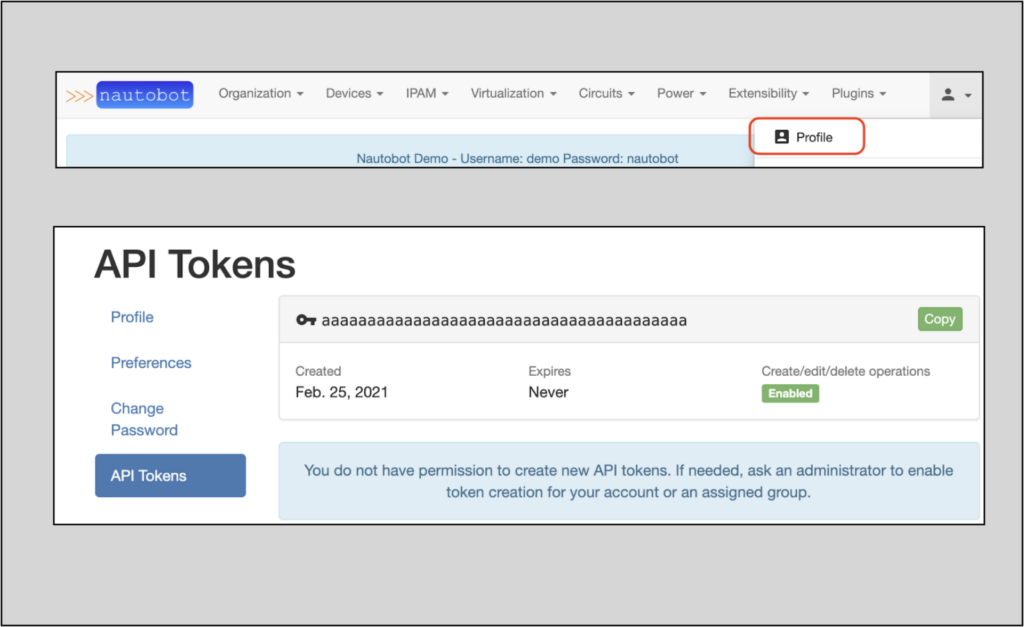
Nautobot security tokens are created in the Web UI. To view your token(s), navigate to the API Tokens page under your user profile. If there is no token present, create one or get the necessary permissions to do so.
Getting Started with Pynautobot
Installing Pynautobot
pynautobot is a Python library. From your environment install it via pip3:
This first example will walk through a pynautobot GraphQL query in a Python interpreter.
Start a Python shell and import pynautobot:
% python3Python 3.9.2 (v3.9.2:1a79785e3e, Feb 192021,09:06:10) [Clang 6.0 (clang-600.0.57)] on darwinType "help","copyright","credits" or "license" for more information.>>>>>>>>>import pynautobot>>>
Taking a quick look at Classes within pynautobot, api is the one we will want to use. The help tells us that the api Class can take url and token as parameters.
This live example will use a query from a previous post. Define query in Python using the exact text from the query used in example 3 in the GraphiQL post:
NOTE: the query text can be found in the last section of the blog, under Text Query Examples and Results
>>>dir(nb.graphql)['__class__',<< dunders snipped >>,'api','query','url']>>>>>>help(nb.graphql.query)Help on method query inmodulepynautobot.core.graphql:query(query: str, variables: Optional[Dict[str, Any]] = None) -> pynautobot.core.graphql.GraphQLRecordmethodofpynautobot.core.graphql.GraphQLQueryinstanceRunsqueryagainstNautobotGraphqlendpoint.Args:query (str): Query string to send to the APIvariables (dict): Dictionary of variables to use with the query string, defaults to NoneRaises:GraphQLException:- When the query string is invalid.TypeError:- When `query` passed in is not oftypestring. - When `variables` passed in is not a dictionary. Exception: - When unknown error is passed in, please open an issue so this can be addressed.Examples:>>>try:... response.raise_for_status()... except Exception ase:... variable = e...>>> variable>>> variable.response.json(){'errors': [{'message':'Cannot query field "nae" on type "DeviceType". Did you mean "name" or "face"?','locations': [{'line':4,'column':5}]}]}>>> variable.response.status_code400Returns:GraphQLRecord: Response of the API call
Using the structure above, create the query and explore the results.
This next example features a full script, using an example from the GraphQL Aliasing with Nautobot post in this series. You can also see the YouTube video that accompanies the post here.
The script below features a query that uses GraphQL aliasing to request device names for multiple sites in a single query. The device names in each site will be returned grouped by the site name; each device name will be alaised with an inventory_hostname key (instead of name) for use in an Ansible environment.
The query text for this script was pulled directly from the Aliasing Solves the Problem section of the referenced blog post and copied directly into the query variable.
import jsonimport pynautobotfrom pprint import pprintprint("Querying Nautobot via pynautobot.")print()url = "https://demo.nautobot.com"print("url is: {}".format(url))print()query = """query { ams_devices:devices(site:"ams") {inventory_hostname:name} sin_devices:devices(site:"sin") {inventory_hostname:name} bkk_devices:devices(site:"bkk") {inventory_hostname:name}}"""print("query is:")print(query)print()token = "aaaaaaaaaaaaaaaaaaaaaaaaaaaaaaaaaaaaaaaa"nb = pynautobot.api(url, token)response = nb.graphql.query(query=query)response_data = response.jsonprint("Here is the response data in json:")pprint(response_data)print()print("Here are the bkk devices:")pprint(response_data['data']['bkk_devices'])
Here is the script’s output:
% python3 -i graphql_ams_query_pynautobot.pyQuerying Nautobot via pynautobot.url is:https://demo.nautobot.comquery is:query {ams_devices:devices(site:"ams") {inventory_hostname:name}sin_devices:devices(site:"sin") {inventory_hostname:name}bkk_devices:devices(site:"bkk") {inventory_hostname:name}}Here is the response data injson:{'data': {'ams_devices': [{'inventory_hostname':'ams-edge-01'},{'inventory_hostname':'ams-edge-02'},{'inventory_hostname':'ams-leaf-01'},{'inventory_hostname':'ams-leaf-02'},{'inventory_hostname':'ams-leaf-03'},{'inventory_hostname':'ams-leaf-04'},{'inventory_hostname':'ams-leaf-05'},{'inventory_hostname':'ams-leaf-06'},{'inventory_hostname':'ams-leaf-07'},{'inventory_hostname':'ams-leaf-08'}],'bkk_devices': [{'inventory_hostname':'bkk-edge-01'},{'inventory_hostname':'bkk-edge-02'},{'inventory_hostname':'bkk-leaf-01'},{'inventory_hostname':'bkk-leaf-02'},{'inventory_hostname':'bkk-leaf-03'},{'inventory_hostname':'bkk-leaf-04'},{'inventory_hostname':'bkk-leaf-05'},{'inventory_hostname':'bkk-leaf-06'},{'inventory_hostname':'bkk-leaf-07'},{'inventory_hostname':'bkk-leaf-08'}],'sin_devices': [{'inventory_hostname':'sin-edge-01'},{'inventory_hostname':'sin-edge-02'},{'inventory_hostname':'sin-leaf-01'},{'inventory_hostname':'sin-leaf-02'},{'inventory_hostname':'sin-leaf-03'},{'inventory_hostname':'sin-leaf-04'},{'inventory_hostname':'sin-leaf-05'},{'inventory_hostname':'sin-leaf-06'},{'inventory_hostname':'sin-leaf-07'},{'inventory_hostname':'sin-leaf-08'}]}}Here are the bkk devices:[{'inventory_hostname':'bkk-edge-01'},{'inventory_hostname':'bkk-edge-02'},{'inventory_hostname':'bkk-leaf-01'},{'inventory_hostname':'bkk-leaf-02'},{'inventory_hostname':'bkk-leaf-03'},{'inventory_hostname':'bkk-leaf-04'},{'inventory_hostname':'bkk-leaf-05'},{'inventory_hostname':'bkk-leaf-06'},{'inventory_hostname':'bkk-leaf-07'},{'inventory_hostname':'bkk-leaf-08'}]>>>
Conclusion
To fully leverage GraphQL’s efficiency, it must be used programmatically. The first post in this series demonstrated using Nautobot’s GraphiQL interface to craft GraphQL queries. This post builds on that by showing how to convert those GraphQL queries into remote requests in Python code for programmatic use.
To find out more about pynautobot, including the additional capabilities not described in this post, start with the pynautobot Github repo.
Does this all sound amazing? Want to know more about how Network to Code can help you do this, reach out to our sales team. If you want to help make this a reality for our clients, check out our careers page.