



Release Overview
We are thrilled to announce the general availability of Nautobot 3.0! This major release represents a significant milestone in our journey to provide the most flexible and extensible Network Source of Truth and Automation Platform. It brings a refreshed user interface, new data models, and powerful platform capabilities now directly integrated.
Our team has listened to community feedback and enterprise requirements for this release: from the introduction of native Approval Workflows and the inclusion of new Load Balancer and VPN data models, to the integration of Data Validation directly into Nautobot itself. We are also excited to showcase two new commercial apps that ensure Nautobot remains the centerpiece of your modern network automation stack.

Nautobot Open Source
UI Refresh and UX Improvements
Nautobot 3.0 delivers a refreshed user interface based on Bootstrap 5, with several major enhancements that directly improve user experience in day-to-day usage of Nautobot.
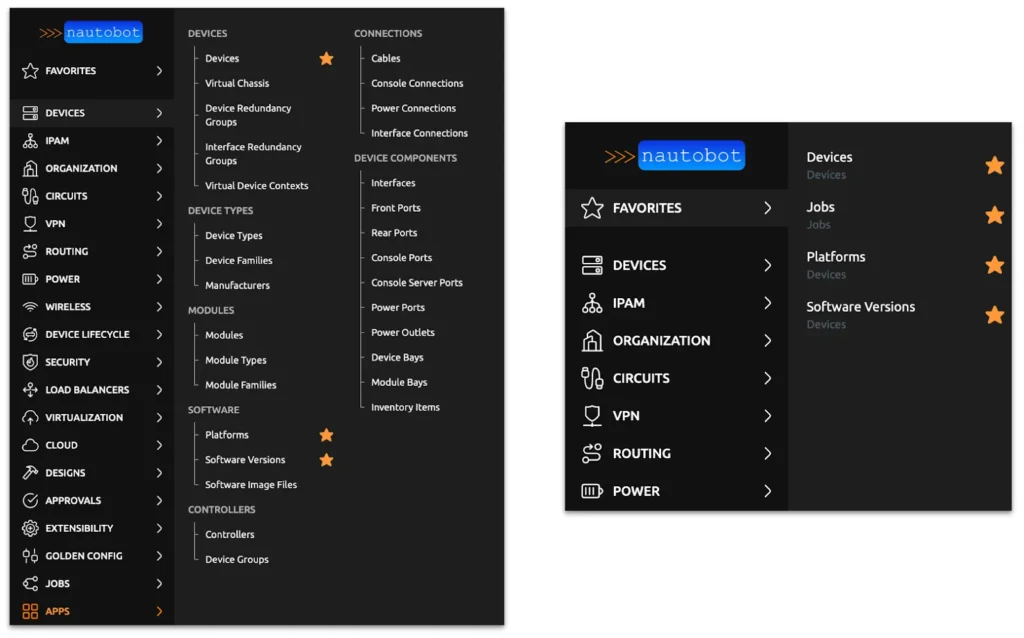
The navigation bar has been redesigned to support marking items as favorites, incorporating intuitive icons, and a modern flyout design that maximizes screen real estate while making all items visible and discoverable without vertical scrolling.
Additionally, the global search experience is now always available via a simple Ctrl+K or Command+K shortcut. It supports advanced syntax, such as in:Devices, allowing users to target specific data models directly, while the results page offers clearer visibility into active parameters to distinguish between basic and advanced queries.

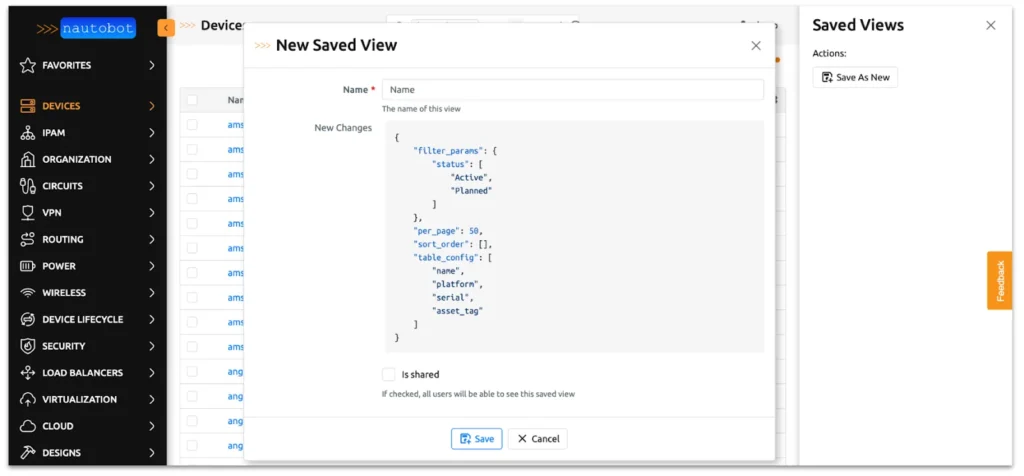
Beyond navigation and search, the interface now handles Saved Views in a side panel, displaying their type more prominently so users can instantly identify active configurations and filters. This change reduces confusion when working with complex data sets, ensuring that operators always have their preferred view handy and understand how it is displayed.
For administrators and developers, Nautobot 3.0 has had a primary goal of keeping the upgrade process straightforward. Based on extensive customer feedback, the upgrade process from version 2.x is designed to be smooth, minimizing back-end code and model changes. Furthermore, we have introduced the UI Component Framework in Nautobot 2.4, which when adopted makes the new UI updates completely seamless. For those of you who have a bit of custom HTML in your custom apps, we have provided tooling to help upgrade your app faster.
For more details on all of these changes, please refer to the Nautobot 3.0 Release Notes.
Approval Workflows
The new Approval Workflows feature brings a multi-stage review system to Nautobot, allowing organizations to enforce strict governance over data changes and other operations performed in Nautobot or against the network through Jobs. These workflows can be defined in advance and attached to specific models based on constraints, modeling real-world processes by requiring sign-off before data or configurations are modified. This provides tighter control over automated changes and reduces the chances for unauthorized or accidental modifications.
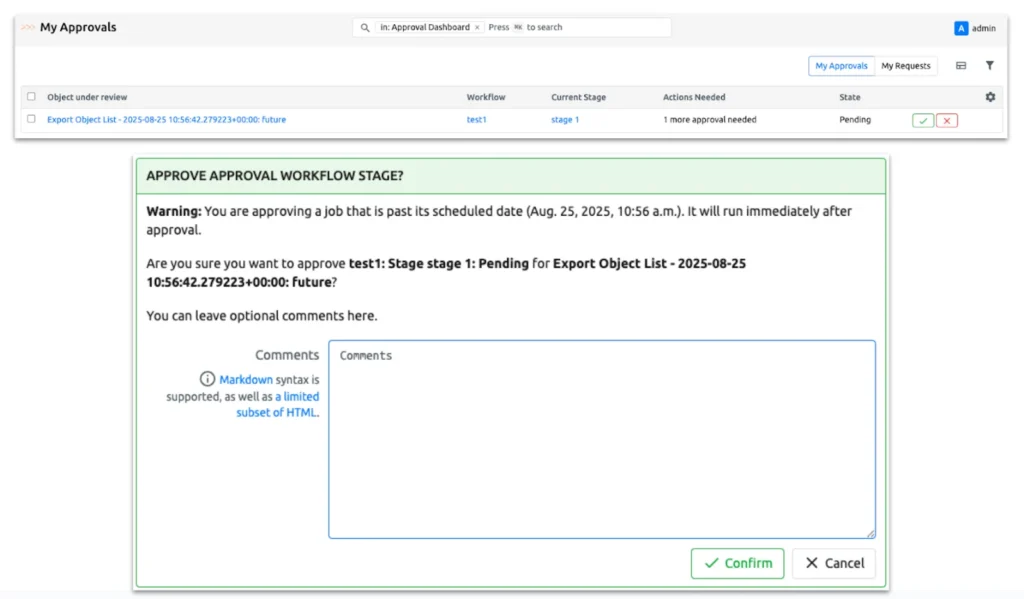
The system supports a wide range of use cases such as preventing the accidental deletion of critical data by requiring manager approval, mandating security team sign-off before enabling production changes, or ensuring multiple stakeholders review large-scale bulk edits. Currently, it applies to Nautobot Job execution, allowing teams to mandate peer review for scheduled jobs that affect multiple systems. Once approved, jobs are added to the top of the execution queue and they will run at their originally scheduled time (or immediately if that time is in the past).
Learn more in the Approval Workflows documentation.
Models: Load Balancers
As a comprehensive Network Source of Truth, Nautobot 3.0 now includes the ability to define and track network load balancers natively. This empowers network operators to store detailed information about their application delivery infrastructure directly alongside their network inventory, utilizing this data to drive even more of their automation workflows. The new models are designed to be vendor-agnostic, ensuring broad compatibility with configuration data from major vendors such as F5, Citrix, and A10.
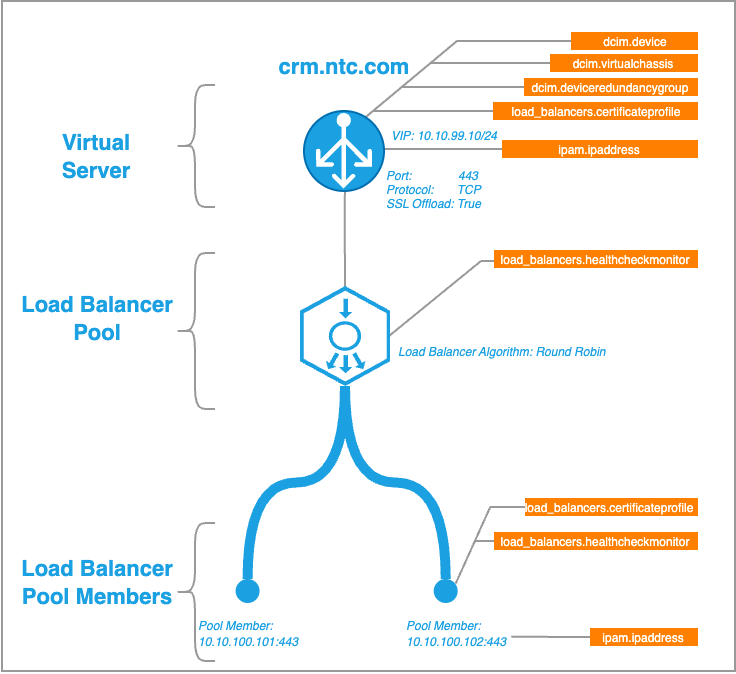
The feature set can model complex load balancing environments, supporting key concepts like Local Traffic Management (LTM) and Global Traffic Management (GTM). It allows for the precise definition of Virtual Servers, Virtual IPs (VIPs), Server Pools, Back-End Servers, Front-End Services, and Healthchecks. In addition, there’s also support for defining SSL Certificate Profiles, so operators can track certificate issuing, expirations, and renewals.
Read more about these models in the documentation, starting with the Load Balancer model reference and then diving deep into the Getting Started guide for detailed real-life examples.
Models: Virtual Private Networks
Nautobot 3.0 introduces a new Virtual Private Networks (VPNs) data model designed to support the modeling of point-to-point Virtual Private Networks, including not only IPSec and GRE, but also IP-in-IP, L2TP, OpenVPN, PPTP, and WireGuard. These new models allow users to define IKE (Phase 1) and IPSec (Phase 2) policy parameters, manage tunnel endpoints, and associate VPNs with roles and secrets. Additionally, VPNs can be optionally associated with tenants, enabling administrators to indicate ownership of related model instances.
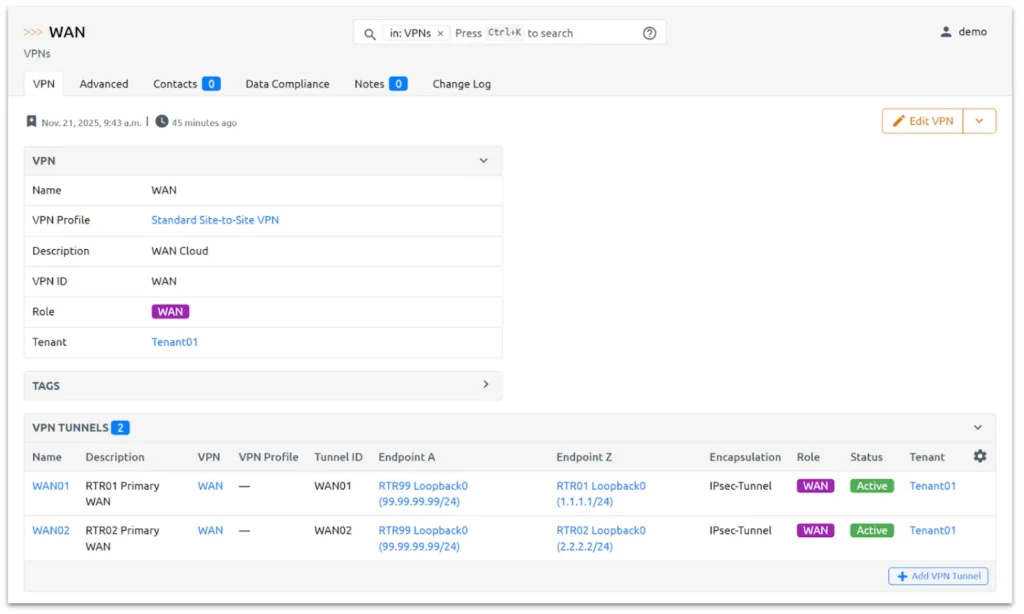
This feature supports a variety of common use cases, including site-to-site IPSec VPN tunnels in both transport and tunnel modes, as well as single or multiple hub-and-spoke configurations. For further details, visit the VPN Models documentation.
Data Validation
The Data Validation Engine app has been integrated into Nautobot 3.0 as a core feature, allowing administrators to enforce data quality standards on creation or modification of objects. Users can define validation rules such as regular expression matches, minimum/maximum values, and required fields to ensure data integrity across Nautobot.
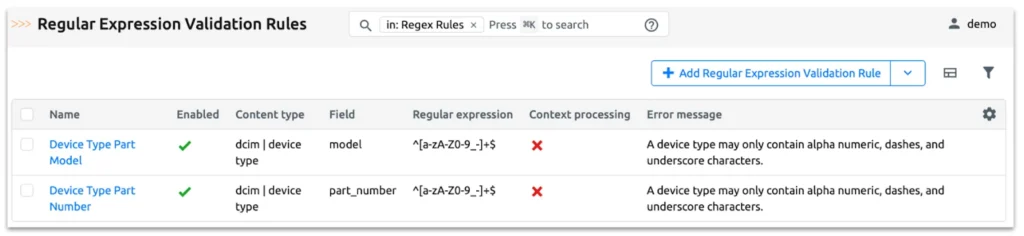
Rather than only checking for adherence to specified rules during the creation or modification of objects, Data Compliance will run a job that produces compliance statuses across existing objects (such as all preexisting devices).
The Data Compliance feature enables the creation of custom validation logic that can be executed as a job as required. This way, you can ensure that both data entered into Nautobot and preexisting data adhere to organizational standards. Read more in the Data Validation and Data Compliance documentation pages.
Charting Library
Nautobot 3.0 incorporates the Apache ECharts library, empowering users to create dynamic and interactive visualizations directly within the UI. This integration allows for the rendering of complex charts and graphs based on Nautobot data without requiring external visualization tools. Upcoming releases of Nautobot will take advantage of this to provide at-a-glance information to both users and administrators by incorporating advanced charting and reporting directly within Nautobot itself.
Developers can utilize this library to build custom dashboards and reports that provide real-time insights into network metrics and data relationships. Check out the Charting Library documentation.
Nautobot Commercial Software
Ansible Automation App
Ansible use is ubiquitous in network automation, but managing Ansible playbook execution often requires jumping to another interface. The Ansible Automation app for Nautobot bridges this gap, eliminating the “swivel-chair” effect between systems like AWX or Red Hat Ansible Automation Platform (AAP) and Nautobot. Users can now view and run Ansible Job Templates directly within the familiar Nautobot Jobs interface.
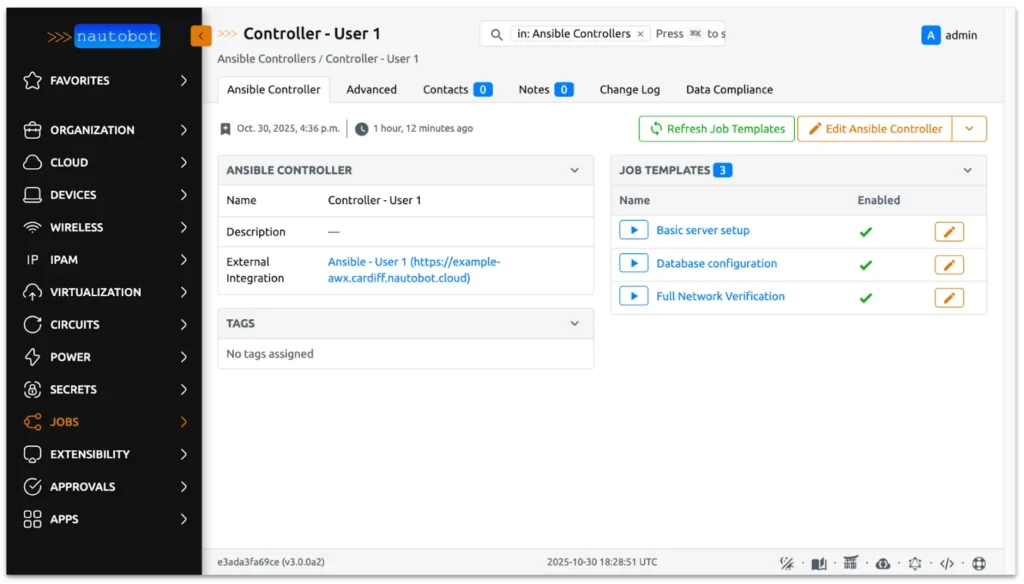
This app further empowers teams to run their automation without leaving the Nautobot interface, as they can both trigger Ansible Jobs and view their results together with any other workflows built with native Nautobot Jobs. As an extra benefit, being able to trigger Ansible jobs from Nautobot means engineers do not need direct access to the underlying Ansible infrastructure.
It is also worth noting that the integration between the two platforms respects the permissions provided by the credentials used to authenticate against the AWX/AAP instances, allowing full control over which Ansible Jobs are available via each controller object defined in Nautobot.
Learn more at the Ansible Automation App online documentation.
Version Control
The Version Control app brings standard development methodologies to the Network Source of Truth platform, integrating support for change management directly with the Nautobot database. Utilizing a hosted Dolt database (MySQL-compatible), this feature treats the database as a repository, enabling Git-like concepts such as Branch, Commit, and Pull actions. This allows for granular control over all of your data changes, including the ability to roll back updates if necessary. Therefore, it provides a safety net for managing network data, ensuring that changes are peer-reviewed and validated via branching strategies before being merged into production and becoming the Source of Truth.
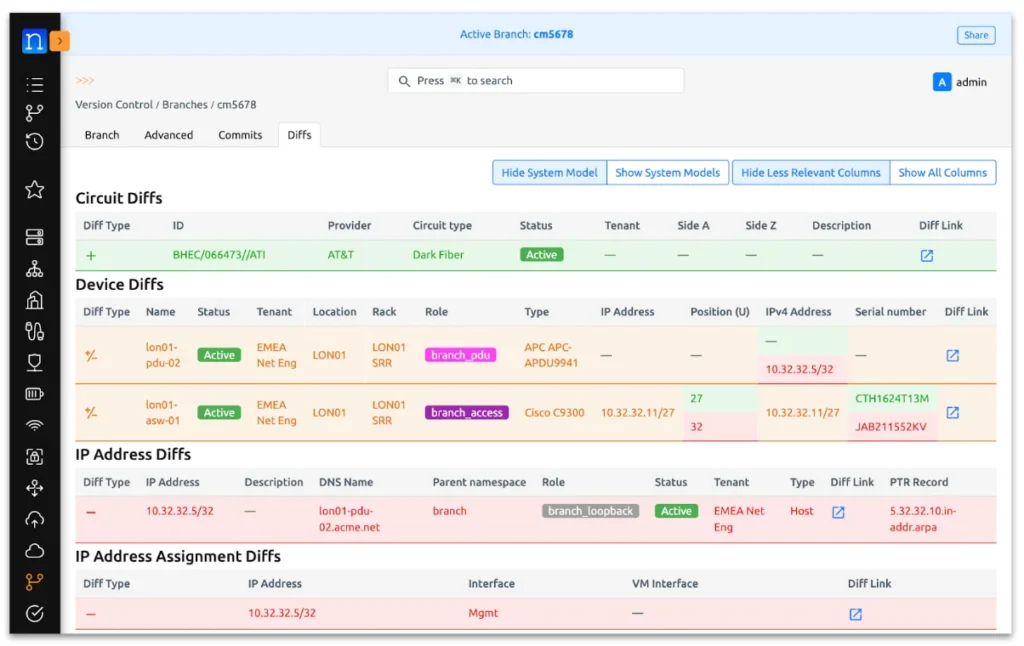
Currently released as Early Access and available exclusively for Nautobot Cloud customers, this app is designed for DevOps-savvy teams looking to upgrade their workflows. Contact us to try out Version Control in Nautobot and help shape the future of the app!
Conclusion
Nautobot 3.0 is a huge leap forward for the leading Network Source of Truth and Automation Platform, bringing essential data models and powerful features into the core product. We believe that these enhancements—from the modernized UI to the robust approval workflows and native support for Load Balancers and VPNs—will improve your ability to manage and automate your network infrastructure.
Together with the release of Nautobot 3.0, we have also upgraded all of our ecosystem of open source Apps (and that’s no mean feat, there are 15 of them!) and SDKs (such as pynautobot, nautobot-ansible, and nornir-nautobot), so you can jump right in and make full use of the new features in 3.0!
We are incredibly proud of this release and eager to see how the community leverages these new capabilities while we are busy working on the next release and more exciting features. The always-on demo sandbox over at https://demo.nautobot.com has already been upgraded and is waiting for you to explore it.
We invite you to install Nautobot 3.0, explore the new features, and share your feedback with us. For a full list of changes and upgrade instructions, please consult the Nautobot 3.0 release notes. Happy automating!
– Cristian
Tags :
Does this all sound amazing? Want to know more about how Network to Code can help you do this, reach out to our sales team. If you want to help make this a reality for our clients, check out our careers page.


